Installation
This section covers the installation steps of the software.
Containerized installation
You can, optionally, create an LXC container.
$ lxc launch ubuntu:23.10 SERIMA --storage your-storage
$ lxc exec SERIMA -- /bin/bash
System packages
$ sudo apt install gettext curl npm postfix
Poetry
$ curl -sSL https://install.python-poetry.org | python3 -
at the end of the ~/.bashrc file add the line:
$ export PATH="/root/.local/bin:$PATH"
PostgreSQL
Install PostgreSQL, the version provided by default for your GNU/Linux distribution.
$ sudo apt-get install postgresql
Create a database, database user:
$ sudo -u postgres createuser <username>
$ sudo -u postgres createdb <database>
$ sudo -u postgres psql
psql (15.6 (Debian 15.6-0+deb12u1))
Type "help" for help.
postgres=# alter user <username> with encrypted password '<password>';
ALTER ROLE
postgres=# grant all privileges on database <database> to <username>;
GRANT
postgres=# ALTER DATABASE <database> OWNER TO <username>;
GRANT
SERIMA
git clone https://github.com/informed-governance-project/SERIMA.git
cd SERIMA
git submodule update --init --recursive
npm install
# Copy the config and adjust the DB connection and the other settings:
cp governanceplatform/config_dev.py governanceplatform/config.py
poetry install
poetry shell
python manage.py migrate
python manage.py collectstatic
python manage.py compilemessages
Theme
In this case, the theme (CSS, icons, etc.) of the software will be under the theme folder as a Git submodule.
You can replace it with your own. Currently, two themes are available:
https://github.com/informed-governance-project/default-theme (default theme, used for ILR Luxembourg)
https://github.com/informed-governance-project/serimabe-theme (theme for IBPT.be)
If you do not want to use the default theme, do not clone the main repository with the submodule.
Configuration
In the configuration file governanceplatform/config.py , ensure that you have configured:
PUBLIC_URLALLOWED_HOSTSOPERATOR_CONTACTandREGULATOR_CONTACTDATABASESHASH_KEYandSECRET_KEYDEBUG: must be set toFalsein a production environmentCSRF_TRUSTED_ORIGINSEMAIL_SENDERetc.
If DEBUG is set to True emails generated by SERIMA won’t be sent but
stored in a dedicated folder at the root of the project.
You must set your secret keys.
Here is an example of the Fernet hash key (HASH_KEY):
$ python -c 'from cryptography.fernet import Fernet; print(Fernet.generate_key())'
b'Xaj5lFGAPiy2Ovzi4YmlWh-s4HHikFV4AswilOPPYN8='
For the Django secret key (SECRET_KEY), you can for example do:
$ python -c 'import secrets; print(secrets.token_hex())'
9cf5c7b13e469e6f6a9403b33410589031cfe927df6471a1cbdef1d4deb57c37
Create the PlatformAdmin user
$ python manage.py createsuperuser
This user will be able to create RegulatorAmin users via the Web interface of SERIMA.
The first PlatformAdmin user will also have to configure the domain name
and the display name of the application:
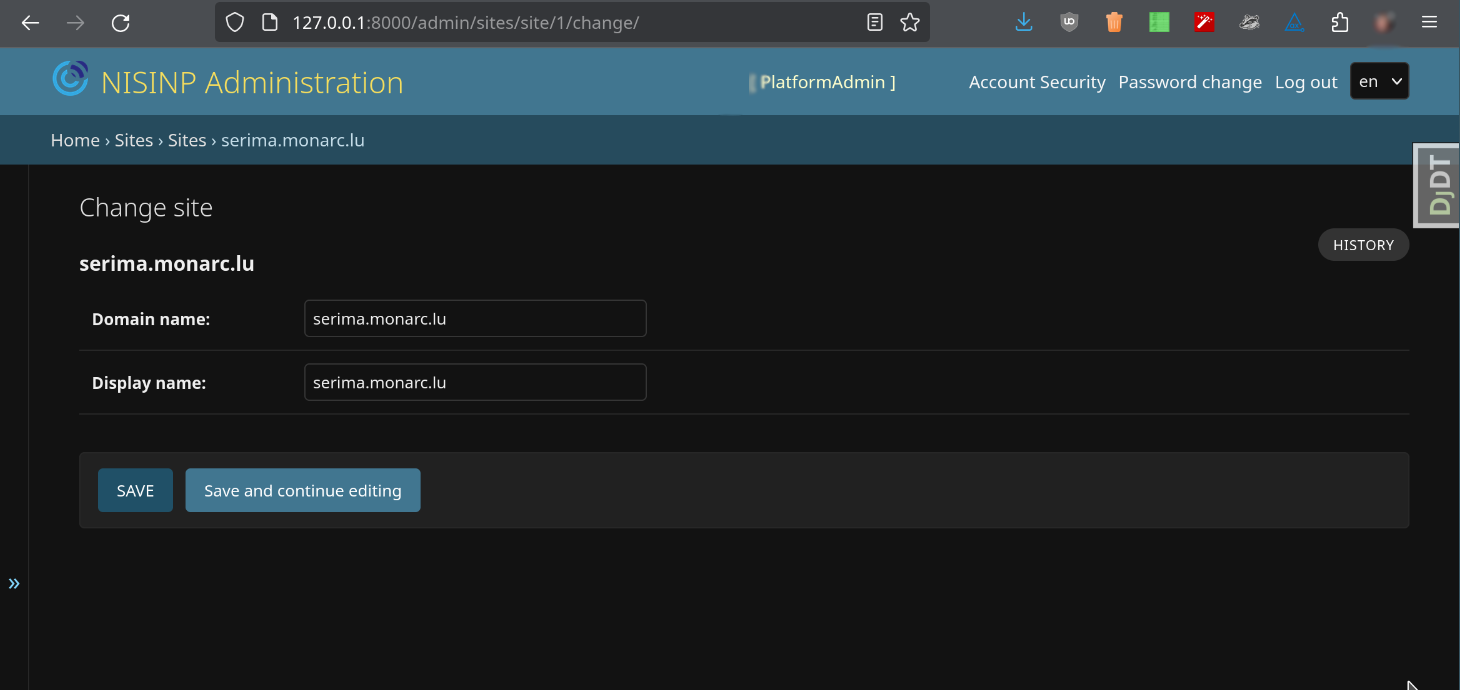
Fig. 1 Django application - Sites configuration.
This step is essential for ensuring the proper functioning of the platform’s email sending, such as for password recovery purposes, as well as for generating QR codes for two-factor authentication (2FA).
Launch the Django application
poetry run python manage.py runserver 127.0.0.1:8000
Of course, do not do that in a production environment.
Scheduled tasks
Configure the cron tasks:
0 * * * * cd /<-application-path->/SERIMA/  ; python manage.py runscript workflow_update_status
0 * * * * cd /<-application-path->/SERIMA/  ; python manage.py runscript email_reminder
The best is to use the Python executable in the virtual environment.
Apache
The mod_wsgi package provides an Apache module that implements a WSGI compliant
interface for hosting Python-based web applications on top of the Apache web
server. Install Apache and this module.
$ sudo apt install apache2 libapache2-mod-wsgi-py3
Note
Only do this if you cannot use the version of mod_wsgi provided by your GNU/Linux distribution:
$ sudo apt install apache2 apache2-dev # apxs2
$ wget https://github.com/GrahamDumpleton/mod_wsgi/archive/refs/tags/5.0.0.tar.gz
$ tar -xzvf 5.0.0.tar.gz
$ cd mod_wsgi-5.0.0/
$ ./configure --with-apxs=/usr/bin/apxs2 --with-python=/home/<user>/.pyenv/shims/python
$ make
$ sudo make install
Then in /etc/apache2/apache2.conf add the lines:
LoadFile /home/<user>/.pyenv/versions/3.11.0/lib/libpython3.11.so
LoadModule wsgi_module /usr/lib/apache2/modules/mod_wsgi.so
Restart Apache:
sudo systemctl restart apache2.service
For the next steps you must have a valid domain name.
Example of VirtualHost configuration file
VirtualHost for a reverse proxy server:
<VirtualHost *:80>
    ServerAdmin info@incidents.serima.lu
    ServerName incidents.serima.lu

    DocumentRoot /var/www/html
    RewriteEngine on
    RewriteRule ^ https://%{SERVER_NAME}%{REQUEST_URI} [END,NE,R=permanent]
</VirtualHost>

<VirtualHost *:443>
    ServerAdmin info@incidents.serima.lu
    DocumentRoot /var/www/html
    ServerName incidents.serima.lu

    # main configuration
    RewriteEngine On
    RewriteCond %{REQUEST_METHOD} !^(GET|POST|PUT|PATCH|DELETE|HEAD)
    RewriteRule .* - [R=405,L]

    SSLProxyEngine On
    ProxyPreserveHost On
    ProxyTimeout 1800

    CustomLog ${APACHE_LOG_DIR}/incidents.serima.lu_access.log combined
    ErrorLog ${APACHE_LOG_DIR}/incidents.serima.lu_error.log

    SSLEngine on
    SSLCertificateFile /etc/ssl/private/incidents_serima_lu/incidents_serima_lu.cer
    SSLCertificateChainFile /etc/ssl/private/incidents_serima_lu/incidents_serima_lu_interm.cer
    SSLCertificateKeyFile /etc/ssl/private/incidents_serima_lu/incidents.serima_lu.key

    ProxyPass / http://web01.private.serima.lu/
    ProxyPassReverse / http://web01.private.serima.lu/
</VirtualHost>
Then configure HTTPS properly. If you want to use Let’s Encrypt:
sudo apt install certbot python3-certbot-apache
sudo certbot certonly --standalone -d incidents.serima.lu
sudo a2enmod rewrite
sudo systemctl restart apache2.service
Verify that the certificate will be automatically updated:
$ cat /etc/letsencrypt/renewal/incidents.serima.lu.conf
# Options used in the renewal process
[renewalparams]
account = <-account-id->
authenticator = apache
server = https://acme-v02.api.letsencrypt.org/directory
VirtualHost for the application:
<VirtualHost *:80>
    ServerName web01.private.serima.lu
    ServerAdmin info@incidents.serima.lu

    WSGIDaemonProcess serima python-path=/home/USER/SERIMA:/home/USER/.cache/pypoetry/virtualenvs/governanceplatform-AGxECetm-py3.10/lib/python3.10/site-packages/
    WSGIProcessGroup serima
    WSGIScriptAlias / /home/USER/SERIMA/governanceplatform/wsgi.py

    <Directory "/home/USER/SERIMA/governanceplatform/">
        <Files "wsgi.py">
            Require all granted
        </Files>
        WSGIApplicationGroup %{GLOBAL}
        WSGIPassAuthorization On

        Options Indexes FollowSymLinks
        Require all granted
    </Directory>

    Alias /static /home/USER/SERIMA/governanceplatform/static
    <Directory /home/USER/SERIMA/static>
        Require all granted
    </Directory>

    # Available loglevels: trace8, ..., trace1, debug, info, notice, warn,
    # error, crit, alert, emerg.
    # It is also possible to configure the loglevel for particular
    # modules, e.g.
    LogLevel warn
    CustomLog ${APACHE_LOG_DIR}/incidents.serima.lu_access.log combined
    ErrorLog ${APACHE_LOG_DIR}/incidents.serima.lu_error.log
</VirtualHost>